Bài viết gần đây
-
5. Tại sao dữ liệu là vũ khí tối thượng của nhà đầu tư hiện đại?
Tháng 3 29, 2026
| XÂY DỰNG BOT AUTO TRADING DÙNG ATR STOP-LOSS
Được viết bởi thanhdt vào ngày 27/11/2025 lúc 16:32 | 100 lượt xem
XÂY DỰNG BOT AUTO TRADING DÙNG ATR STOP-LOSS (BẢO VỆ TÀI KHOẢN CHUYÊN NGHIỆP)
(Bài chuẩn SEO: bot auto trading python, ATR stop loss, quản trị rủi ro)
Trong giao dịch Futures, quản trị rủi ro quan trọng hơn chiến lược.
Hàng nghìn trader có winrate cao nhưng vẫn cháy tài khoản vì đặt Stop-loss sai hoặc quá chặt.
Giải pháp chuẩn dành cho bot auto trading là:
ATR STOP-LOSS (Average True Range)
→ Stop-loss tự động theo biến động thực tế của thị trường
→ Giúp bot chống quét SL (stop-hunting)
→ Giảm drawdown mạnh
Bài viết này hướng dẫn cách xây dựng bot auto trading Python + Binance Futures + ATR Stop-loss đầy đủ.
1. ATR là gì? Tại sao dùng ATR cho bot trading?
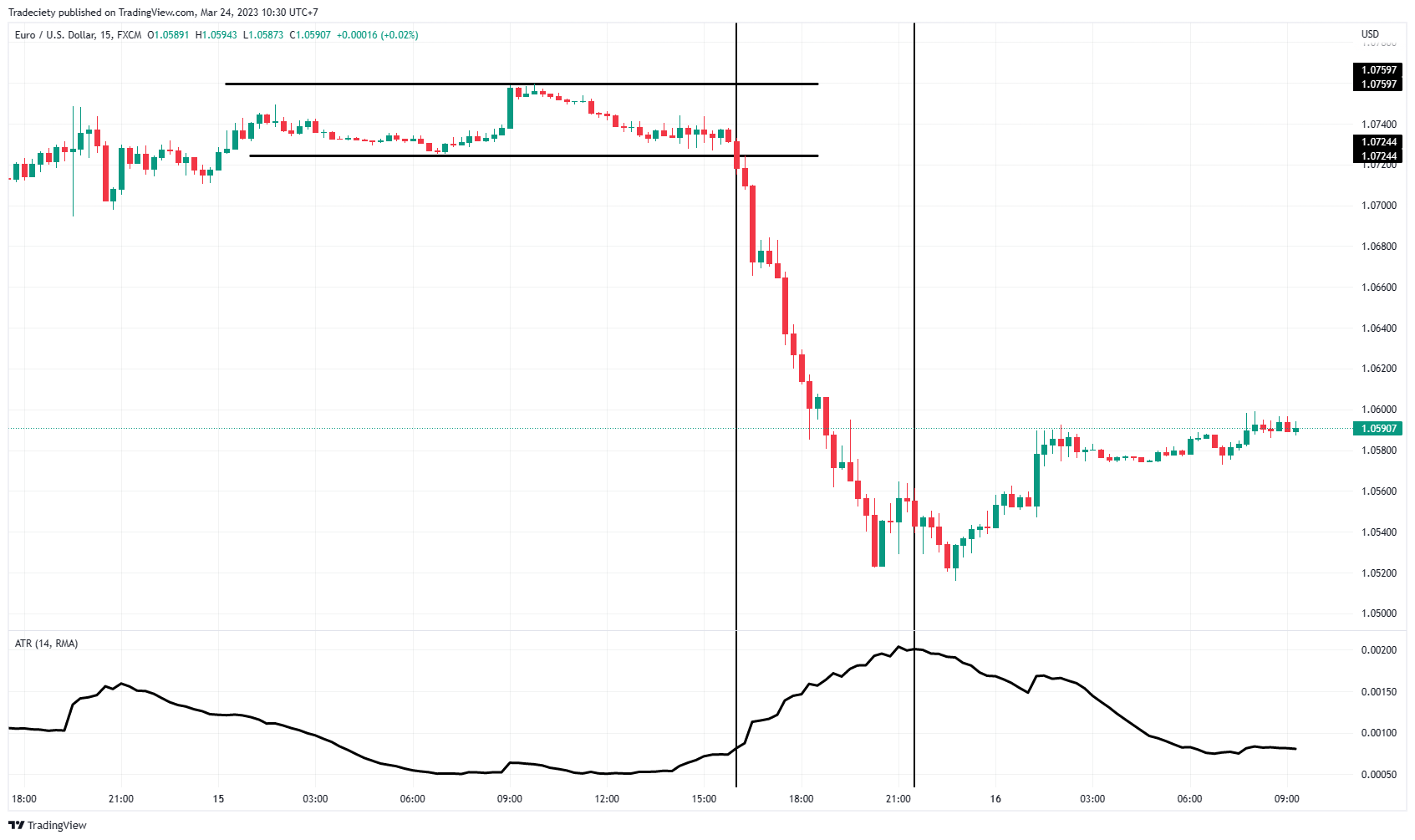
ATR (Average True Range) đo mức độ biến động của giá.
ATR cao → thị trường biến động mạnh
ATR thấp → thị trường đi ngang / sideway
Công thức ATR Stop-loss chuẩn:
- LONG SL = Entry − (ATR × hệ số)
- SHORT SL = Entry + (ATR × hệ số)
- Hệ số phổ biến = 1.5 – 2.0
Ưu điểm:
✔ Không bị stop-hunt (quét SL)
✔ Phù hợp bot xu hướng
✔ Tự động giãn SL khi biến động mạnh
2. Cài thư viện cho bot auto trading
pip install ccxt
pip install pandas numpy
pip install python-binance
pip install python-dotenv
3. Lấy dữ liệu nến (Binance Futures)
import ccxt
import pandas as pd

binance = ccxt.binance({
    'options': {'defaultType': 'future'}
})

def get_klines(symbol="BTC/USDT", tf="15m", limit=200):
    df = pd.DataFrame(
        binance.fetch_ohlcv(symbol, tf, limit=limit),
        columns=["time","open","high","low","close","volume"]
    )
    return df
4. Tính ATR cho bot auto trading Python
def compute_atr(df, period=14):
    df['H-L'] = df['high'] - df['low']
    df['H-PC'] = abs(df['high'] - df['close'].shift(1))
    df['L-PC'] = abs(df['low'] - df['close'].shift(1))
    df['TR'] = df[['H-L','H-PC','L-PC']].max(axis=1)
    df['ATR'] = df['TR'].rolling(period).mean()
    return df
5. Tạo chiến lược vào lệnh đơn giản + ATR Stop-loss
Ví dụ bot vào lệnh khi giá đóng cửa vượt MA20:
def get_signal(df):
    if df['close'].iloc[-1] > df['MA20'].iloc[-1]:
        return "LONG"
    if df['close'].iloc[-1] < df['MA20'].iloc[-1]:
        return "SHORT"
    return "NONE"
Tính stop-loss ATR:
def atr_stoploss(entry_price, atr_value, direction, multiplier=1.5):
    if direction == "LONG":
        return entry_price - atr_value * multiplier
    if direction == "SHORT":
        return entry_price + atr_value * multiplier
6. Gửi lệnh + đặt ATR Stop-loss vào Binance Futures


from binance.client import Client
from dotenv import load_dotenv
import os

load_dotenv()
client = Client(os.getenv("BINANCE_API_KEY"), os.getenv("BINANCE_API_SECRET"))

def place_order(symbol, side, qty, sl_price):
    # lệnh vào thị trường
    client.futures_create_order(
        symbol=symbol,
        side=side,
        type="MARKET",
        quantity=qty
    )

    # đặt ATR Stop-loss
    client.futures_create_order(
        symbol=symbol,
        side="SELL" if side=="BUY" else "BUY",
        type="STOP_MARKET",
        stopPrice=sl_price,
        closePosition=True
    )

    print("Order executed – SL:", sl_price)
7. Full code bot auto trading ATR Stop-loss
import time

symbol = "BTCUSDT"
qty = 0.01

while True:
    try:
        df = get_klines(symbol)
        df = compute_atr(df)
        df['MA20'] = df['close'].rolling(20).mean()

        sig = get_signal(df)
        atr = df['ATR'].iloc[-1]
        entry = df['close'].iloc[-1]

        if sig == "LONG":
            sl = atr_stoploss(entry, atr, "LONG")
            place_order(symbol, "BUY", qty, sl)

        if sig == "SHORT":
            sl = atr_stoploss(entry, atr, "SHORT")
            place_order(symbol, "SELL", qty, sl)

    except Exception as e:
        print("Error:", e)

    time.sleep(10)
8. Tối ưu ATR cho từng thị trường
Khung thời gian:
- Scalping: 1m – 5m
- Day trading: 15m – 1H
- Swing trading: 4H – D1
ATR multiplier:
- Scalping: 1.0 – 1.3
- Trend following: 1.5 – 2.0
- Rung lắc cao: 2.0 – 3.0
9. Ưu điểm của Bot Auto Trading ATR Stop-loss