Bài viết gần đây
-
-
Backend là gì? Toàn bộ cách một hệ thống web vận hành phía sau
Tháng 10 1, 2026
XÂY DỰNG ỨNG DỤNG MẪU HOÀN CHỈNH VỚI FLUTTER
Được viết bởi Đặng Trí Thanh vào ngày 28/11/2025 lúc 21:30 | 225 lượt xem
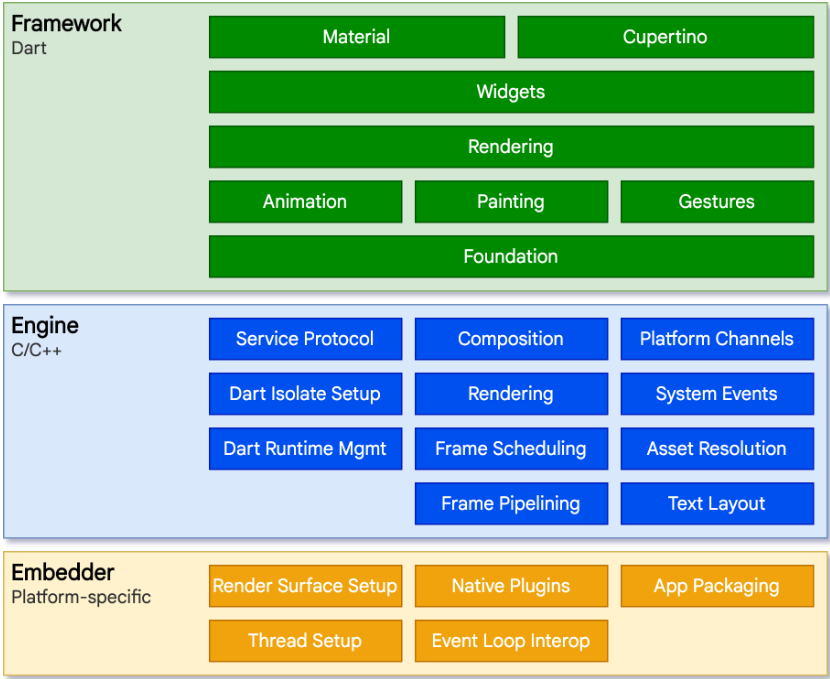
XÂY DỰNG ỨNG DỤNG MẪU HOÀN CHỈNH VỚI FLUTTER
Login – API – CRUD – Upload ảnh – Repository – State Management
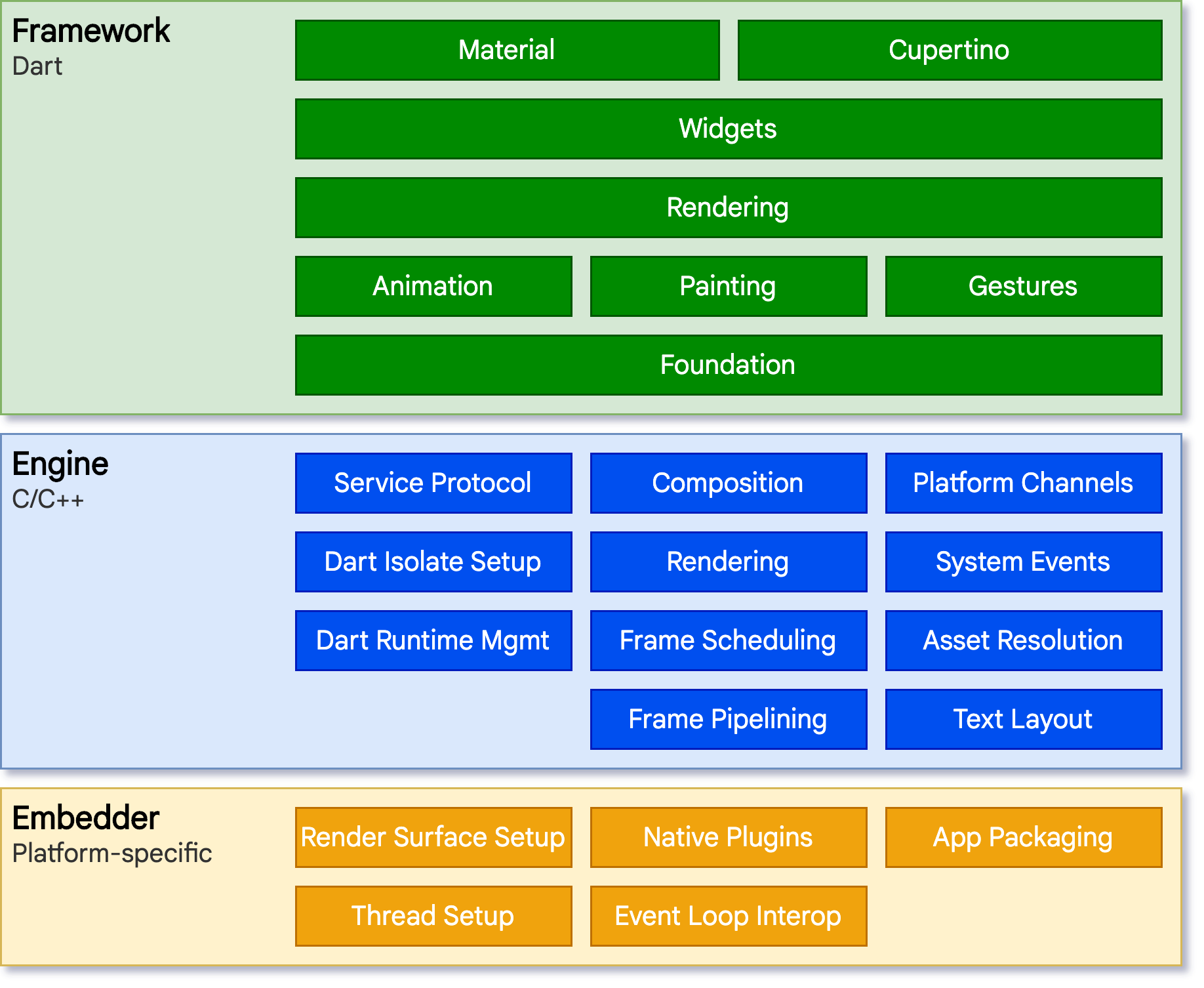
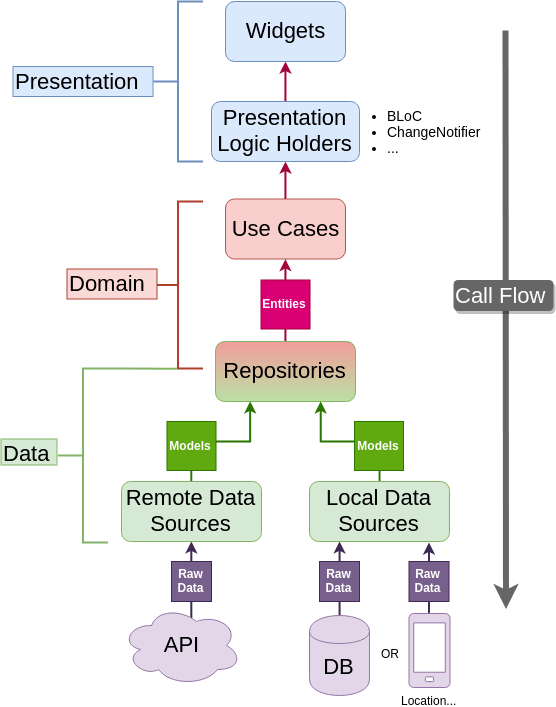

Bài này mô tả quy trình xây dựng một ứng dụng Flutter hoàn chỉnh, phù hợp cho dự án thực tế hoặc sản phẩm MVP. Ứng dụng bao gồm:
- Đăng nhập bằng API
- Lưu token
- Lấy danh sách dữ liệu (Users, Products, Posts…)
- CRUD dữ liệu
- Upload ảnh
- State management
- Repository pattern
- Tách tầng Clean Architecture
1. PHÂN TÍCH ỨNG DỤNG MẪU
Ứng dụng mẫu có các module:
- Màn hình Login
- Màn hình Dashboard
- Danh sách Items
- Chi tiết Item
- Tạo – Sửa – Xóa Item (CRUD)
- Upload ảnh
- Quản lý token & bảo mật
- Routing
- State Management (Riverpod hoặc Bloc)
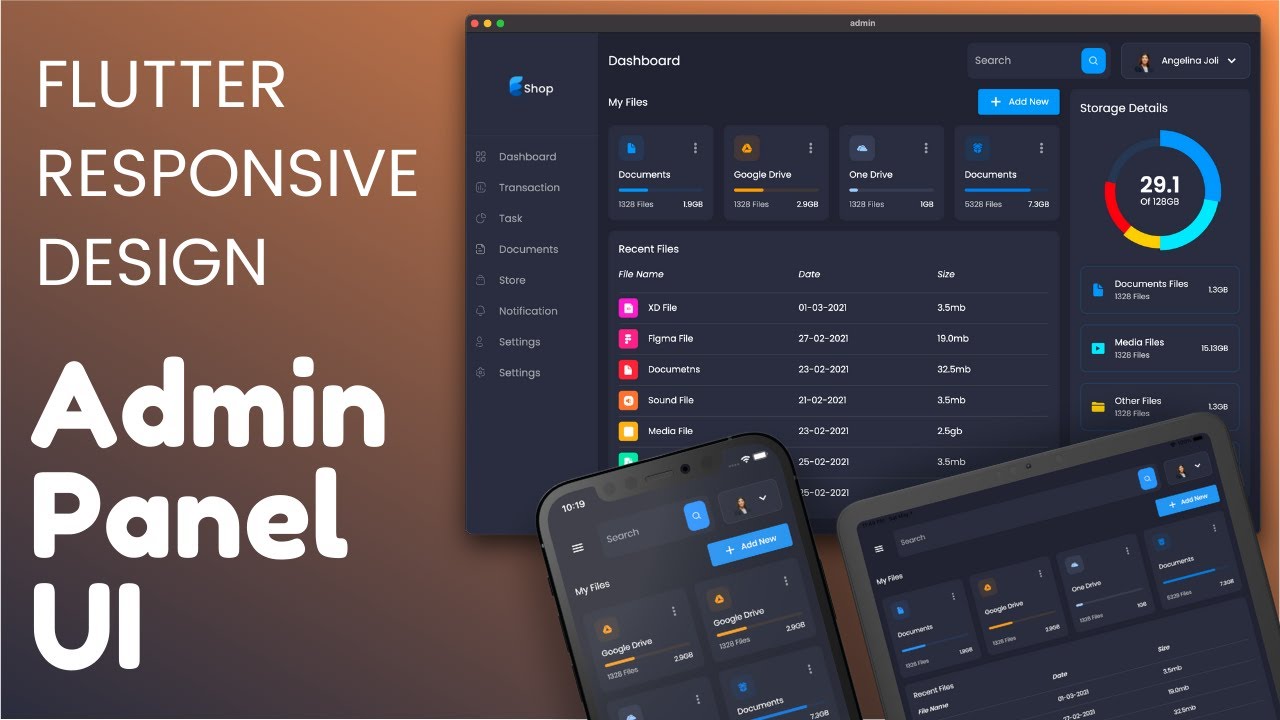

2. CẤU TRÚC DỰ ÁN
Cấu trúc đề xuất:
lib/
 ├── core/
 │    ├── error/
 │    ├── network/
 │    └── utils/
 ├── data/
 │    ├── models/
 │    ├── datasources/
 │    └── repositories/
 ├── domain/
 │    ├── entities/
 │    └── usecases/
 └── presentation/
      ├── login/
      ├── dashboard/
      ├── items/
      └── widgets/
3. MODULE LOGIN (API + TOKEN + SECURE STORAGE)
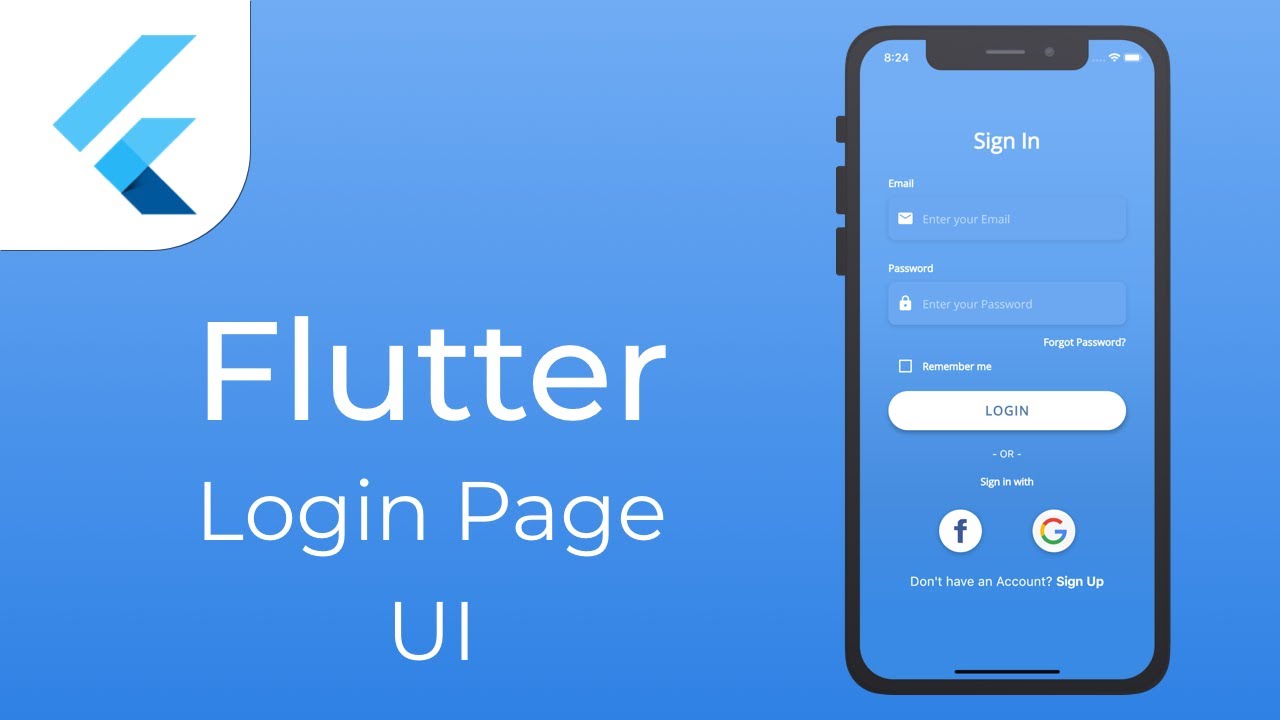

API Login (POST)
POST /auth/login
{
  "email": "user@example.com",
  "password": "123456"
}
Backend trả về:
{
  "token": "jwt_token_here",
  "user": { "id": 1, "name": "Thanh" }
}
Flutter gọi API
Dùng Dio:
final response = await dio.post(
  "/auth/login",
  data: {"email": email, "password": password},
);
Lưu token
Dùng flutter_secure_storage:
await storage.write(key: "token", value: response.data['token']);
Tự động thêm token vào mọi request
dio.interceptors.add(
  InterceptorsWrapper(
    onRequest: (options, handler) async {
      final token = await storage.read(key: "token");
      if (token != null) {
        options.headers["Authorization"] = "Bearer $token";
      }
      return handler.next(options);
    },
  ),
);
4. MODULE LIST + DETAIL (READ DATA)


API
GET /items
GET /items/:id
Flutter
Dùng FutureProvider (Riverpod):
final itemsProvider = FutureProvider<List<Item>>((ref) {
  return ref.read(itemRepositoryProvider).getItems();
});
Trong UI:
ref.watch(itemsProvider).when(
  data: (items) => ListView.builder(
    itemCount: items.length,
    itemBuilder: (_, i) => ListTile(
      title: Text(items[i].name),
    ),
  ),
  loading: () => CircularProgressIndicator(),
  error: (_, __) => Text("Error"),
);
5. MODULE CREATE – UPDATE – DELETE (CRUD)
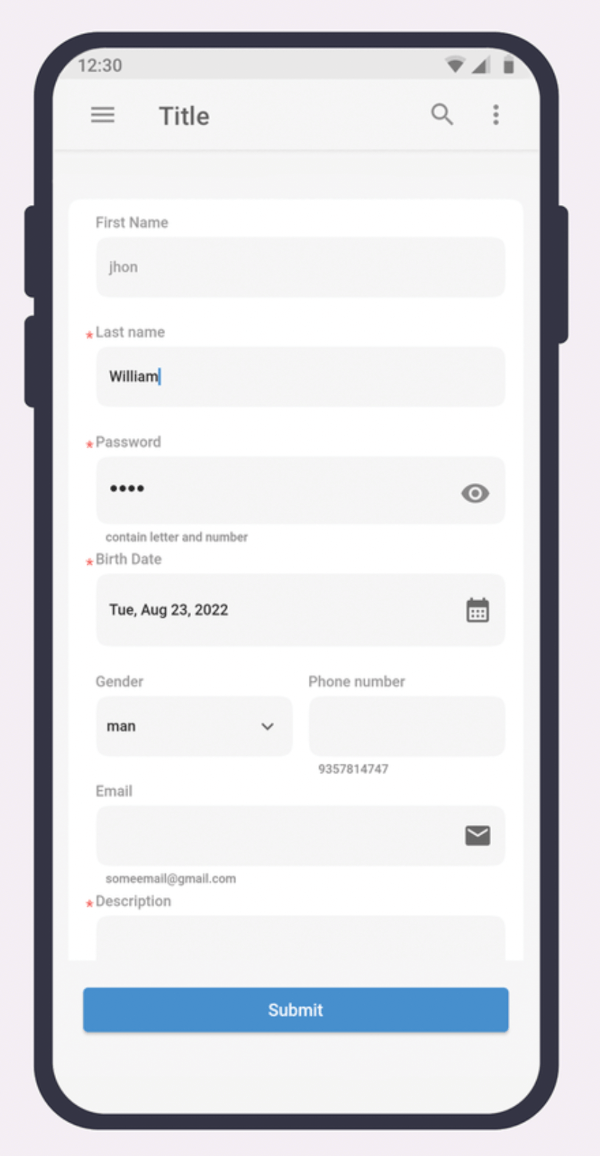


API
POST /items
PUT /items/:id
DELETE /items/:id
Flutter: Form Data
await dio.post("/items", data: {
  "name": nameController.text,
  "description": descController.text,
});
Sửa:
await dio.put("/items/$id", data: updatedData);
Xóa:
await dio.delete("/items/$id");
6. MODULE UPLOAD ẢNH


Chọn ảnh từ thư viện
Dùng image_picker:
final image = await ImagePicker().pickImage(source: ImageSource.gallery);
Upload ảnh
final formData = FormData.fromMap({
  "file": await MultipartFile.fromFile(image.path),
});

await dio.post("/items/$id/upload", data: formData);
Backend trả URL → hiển thị
Image.network(item.imageUrl);
7. ROUTING & FLOW ỨNG DỤNG
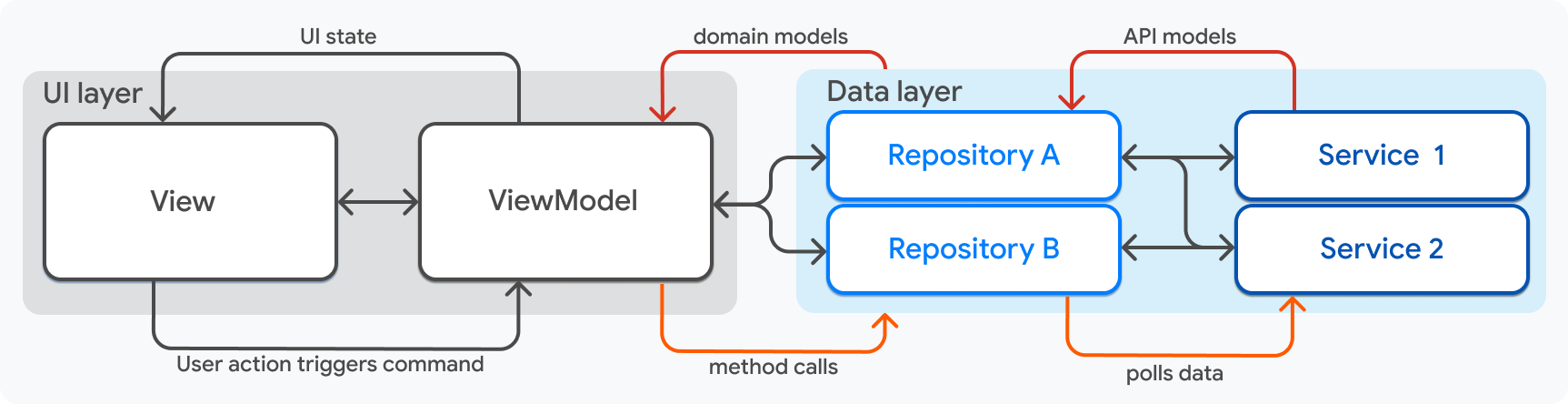

Routing đề xuất:
/login/dashboard/items/items/create/items/:id/items/:id/edit
Dùng go_router hoặc Navigator 2.0.
8. STATE MANAGEMENT CHO ỨNG DỤNG MẪU
Sử dụng Riverpod hoặc Bloc để quản lý:
- Trạng thái loading
- Error
- Data
- Action (create/update/delete)
Ví dụ với StateNotifier:
class ItemController extends StateNotifier<ItemState> {
  ItemController(this.repo) : super(ItemInitial());

  Future<void> createItem(ItemData data) async {
    state = ItemLoading();
    try {
      await repo.createItem(data);
      state = ItemSuccess();
    } catch (_) {
      state = ItemError();
    }
  }
}
9. DEPLOY ỨNG DỤNG

Android:
flutter build apk
flutter build appbundle
iOS:
flutter build ios --release
Web:
flutter build web
Có thể deploy lên:
- Firebase Hosting
- Vercel
- Hostinger (upload folder build/web)
10. TỔNG KẾT QUY TRÌNH XÂY DỰNG ỨNG DỤNG
- Phân tích cấu trúc
- Login + Token
- Repository + Model
- Fetch data (List/Detail)
- CRUD
- Upload ảnh
- Routing
- State management
- Deploy
Quy trình này là tiêu chuẩn cho mọi ứng dụng Flutter có backend.
THAM CHIẾU – TÀI LIỆU FLUTTER
Toàn bộ tài nguyên và lộ trình học Flutter bạn có thể xem tại:
https://www.huongnghieplaptrinhflutter.com
Tổng quan về xây dựng ứng dụng
Xây Dựng Ứng Dụng là chủ đề được nhiều người quan tâm trong cộng đồng đầu tư và lập trình. Hiểu đúng bản chất giúp bạn áp dụng hiệu quả vào công việc và đầu tư.
Bài viết này tổng hợp kiến thức về xây dựng ứng dụng: khái niệm, các bước thực hiện, ví dụ minh họa và câu hỏi thường gặp.
Các khái niệm cần nắm
| Khái niệm | Giải thích | Ví dụ |
|---|---|---|
| Khái niệm 1 | Nền tảng của chủ đề | Áp dụng thực tế |
| Khái niệm 2 | Mở rộng kiến thức | Tình huống cụ thể |
| Khái niệm 3 | Ứng dụng nâng cao | Kết hợp nhiều yếu tố |
Các bước thực hiện chi tiết
Bắt đầu từ việc xác định mục tiêu rõ ràng, sau đó chia nhỏ công việc thành từng bước có thể kiểm tra được. Ghi chép lại quá trình để rút kinh nghiệm.
def main():
    # bước 1: xác định mục tiêu
    # bước 2: thu thập thông tin
    # bước 3: thực hiện và kiểm tra
    print('Hoàn thành')

if __name__ == '__main__':
    main()
Lưu ý và lỗi thường gặp
Lỗi phổ biến là làm tắt các bước quan trọng dẫn đến kết quả sai. Hãy kiểm tra từng giai đoạn và sẵn sàng quay lại điều chỉnh khi cần.
Câu hỏi thường gặp về xây dựng ứng dụng
Tôi nên bắt đầu học xây dựng ứng dụng từ đâu?
Hãy bắt đầu từ khái niệm cơ bản, làm theo ví dụ, rồi tự áp dụng vào một bài toán nhỏ của riêng bạn.
Cần bao lâu để thành thạo?
Tùy vào thời gian đầu tư, nhưng với thực hành đều đặn vài tuần bạn sẽ nắm được phần cốt lõi và tiếp tục phát triển.
Có tài liệu nào nên đọc không?
Ưu tiên tài liệu chính thức và các khóa học có bài tập thực hành, kết hợp với việc tự xây dựng dự án nhỏ.
Kết luận
Xây Dựng Ứng Dụng là hành trình cần sự kiên trì và thực hành. Hãy đặt mục tiêu nhỏ, hoàn thành từng bước và không ngừng cải thiện để đạt kết quả tốt nhất.
Checklist kiểm tra trước khi áp dụng xây dựng ứng dụng
Trước khi triển khai xây dựng ứng dụng, hãy dùng checklist dưới đây để đảm bảo bạn không bỏ sót bước quan trọng nào. Checklist giúp quy trình trở nên nhất quán và giảm thiểu sai sót.
| # | Hạng mục | Trạng thái |
|---|---|---|
| 1 | Mục tiêu rõ ràng, đo lường được | [ ] |
| 2 | Dữ liệu / thông tin đầu vào đầy đủ | [ ] |
| 3 | Công cụ và môi trường sẵn sàng | [ ] |
| 4 | Quy trình từng bước được xác định | [ ] |
| 5 | Kế hoạch kiểm tra kết quả | [ ] |
| 6 | Phương án xử lý rủi ro | [ ] |
| 7 | Ghi chép và lưu trữ kết quả | [ ] |
Hãy hoàn thành từng mục trước khi chuyển sang bước thực hiện chính. Nếu bất kỳ mục nào chưa sẵn sàng, hãy dành thời gian xử lý trước thay vì lao vào làm vội. Chuẩn bị kỹ lưỡng giúp bạn tránh những sửa chữa tốn kém về sau.
Sau khi hoàn thành
Sau khi triển khai, hãy quay lại kiểm tra từng mục và ghi chú kết quả. Những ghi chú này là tài liệu tham khảo quý giá cho lần triển khai tiếp theo, giúp bạn rút ngắn thời gian và nâng cao chất lượng dần theo thời gian.
Case study điển hình về xây dựng ứng dụng
Để thấy rõ giá trị thực tế của xây dựng ứng dụng, chúng ta xem xét một case study điển hình. Một người mới bắt đầu với ít kinh nghiệm, sau khi áp dụng có hệ thống đã đạt được kết quả rõ rệt trong một khoảng thời gian nhất định.
Ban đầu, họ dành thời gian học khái niệm và xây dựng phiên bản tối giản. Thay vì tìm kiếm giải pháp hoàn hảo, họ tập trung vào việc hoàn thành từng bước nhỏ và đo lường kết quả. Cách tiếp cận này giúp họ duy trì động lực và cải thiện liên tục.
| Mốc thời gian | Hành động | Kết quả |
|---|---|---|
| Tháng 1 | Học cơ bản, chuẩn bị công cụ | Nắm nền tảng |
| Tháng 2 | Xây dựng phiên bản đầu tiên | Có sản phẩm chạy được |
| Tháng 3 | Kiểm thử và tối ưu | Kết quả cải thiện |
| Tháng 4 | Mở rộng và tự động hóa | Tiết kiệm thời gian đáng kể |
| Tháng 6 | Vận hành ổn định | Kết quả nhất quán, dài hạn |
Bài học rút ra từ case study
Bài học quan trọng nhất là sự kiên trì và làm có hệ thống. Không có bước nhảy thần kỳ nào, chỉ có sự tích lũy đều đặn. Bạn cũng nên sẵn sàng điều chỉnh khi dữ liệu cho thấy cần thay đổi, thay vì cố chấp giữ nguyên kế hoạch cũ.
Xu hướng và tương lai của xây dựng ứng dụng
Lĩnh vực liên quan đến xây dựng ứng dụng đang phát triển rất nhanh. Hiểu được xu hướng giúp bạn chuẩn bị tốt hơn và nắm bắt cơ hội trước khi chúng trở nên phổ biến.
Một xu hướng rõ ràng là sự tự động hóa ngày càng sâu. Những công việc từng đòi hỏi thao tác thủ công đang dần được thay thế bằng các quy trình tự động, giúp con người tập trung vào quyết định chiến lược.
Xu hướng thứ hai là vai trò ngày càng lớn của dữ liệu và trí tuệ nhân tạo. Việc ra quyết định dựa trên dữ liệu khách quan đang trở thành chuẩn mực, thay vì dựa vào cảm tính.
| Xu hướng | Tác động | Cơ hội |
|---|---|---|
| Tự động hóa | Giảm công việc thủ công | Xây dựng hệ thống 24/7 |
| Dữ liệu lớn | Quyết định chính xác hơn | Phân tích sâu hơn |
| AI / Machine Learning | Tự học và thích nghi | Mô hình thông minh hơn |
| Đa nền tảng | Phủ rộng người dùng | Ứng dụng linh hoạt |
| Bảo mật | An toàn hơn | Niềm tin của người dùng |
Chuẩn bị cho tương lai
Để không bị tụt lại, hãy xây dựng nền tảng vững chắc về kiến thức cốt lõi và không ngừng học hỏi công nghệ mới. Kỹ năng học cách học chính là lợi thế cạnh tranh bền vững nhất trong thời đại thay đổi nhanh.
Tổng kết và các bước hành động tiếp theo về xây dựng ứng dụng
Qua bài viết, chúng ta đã đi qua các khía cạnh quan trọng của xây dựng ứng dụng: khái niệm cốt lõi, cách triển khai, các lỗi cần tránh và những thực hành tốt nhất. Điều quan trọng là biến kiến thức thành hành động.
| Hành động | Chi tiết | Thời gian dự kiến |
|---|---|---|
| Ôn lại lý thuyết | Đọc lại các khái niệm chính | 30 phút |
| Làm bài tập nhỏ | Áp dụng vào một ví dụ cụ thể | 1-2 giờ |
| Xây dựng dự án nhỏ | Tạo sản phẩm tối giản | Vài ngày |
| Chia sẻ & phản hồi | Tham gia cộng đồng | Liên tục |
| Đánh giá định kỳ | Xem lại kết quả mỗi tuần | Định kỳ |
Hãy bắt đầu ngay hôm nay với một bước nhỏ. Đừng chờ đến khi có đủ điều kiện hoàn hảo, vì điều kiện hoàn hảo hiếm khi đến. Việc bắt đầu sớm và kiên trì chính là yếu tố quyết định sự thành công của bạn với chủ đề này.
Phân tích chuyên sâu về xây dựng ứng dụng
Để hiểu đầy đủ về xây dựng ứng dụng, chúng ta cần phân tích từ nhiều góc độ: bản chất, cách vận hành, điều kiện áp dụng và kết quả kỳ vọng. Mỗi góc độ giúp bạn có một bức tranh hoàn chỉnh hơn trước khi đưa ra quyết định.
Về bản chất, xây dựng ứng dụng không phải là một phép màu mà là kết quả của quá trình nghiên cứu, thử nghiệm và tối ưu liên tục. Người thành công thường bắt đầu từ những bước nhỏ, đo lường kết quả và điều chỉnh dần.
Điều kiện áp dụng cũng rất quan trọng. Một phương pháp hiệu quả với người này chưa chắc phù hợp với người khác, vì vậy bạn cần đối chiếu với hoàn cảnh cụ thể của mình: vốn, thời gian, kiến thức và khả năng chịu rủi ro.
| Góc độ | Câu hỏi cần trả lời | Ý nghĩa thực tế |
|---|---|---|
| Bản chất | Nó hoạt động dựa trên nguyên lý gì? | Hiểu cốt lõi để không áp dụng sai |
| Vận hành | Quy trình thực hiện ra sao? | Biết rõ từng bước để kiểm soát |
| Điều kiện | Khi nào nên / không nên dùng? | Tránh lạm dụng gây rủi ro |
| Kết quả | Kỳ vọng hợp lý là gì? | Đặt mục tiêu thực tế, đo lường được |
| Rủi ro | Điều gì có thể sai? | Có kế hoạch dự phòng |
Cách tư duy đúng khi nghiên cứu xây dựng ứng dụng
Hãy luôn đặt câu hỏi: dữ liệu này từ đâu, giả định nào đang được dùng, và nếu giả định sai thì kết quả thay đổi ra sao. Tư duy phản biện giúp bạn tránh những kết luận vội vàng và những quyết định thiếu cơ sở.
Ví dụ thực tế về xây dựng ứng dụng
Để minh họa rõ hơn, chúng ta xét một ví dụ thực tế áp dụng xây dựng ứng dụng. Giả sử bạn muốn triển khai nó vào công việc hằng ngày: bắt đầu từ việc xác định mục tiêu, thu thập dữ liệu cần thiết, rồi thực hiện từng bước.
Bước đầu tiên, hãy liệt kê các tài nguyên và công cụ bạn đang có. Bước thứ hai, xây dựng một phiên bản tối giản nhất có thể chạy được. Bước thứ ba, kiểm tra kết quả trên dữ liệu nhỏ trước khi mở rộng.
# ví dụ tối giản: chạy thử từng bước
def step_1():
    print('Thu thập dữ liệu')
def step_2():
    print('Xử lý và phân tích')
def step_3():
    print('Đánh giá kết quả')
for f in (step_1, step_2, step_3):
    f()
Kết quả ban đầu có thể chưa hoàn hảo, nhưng quan trọng là bạn có một vòng lặp làm → đo → học. Mỗi vòng lặp giúp bạn hiểu sâu hơn và cải thiện chất lượng.
Điều chỉnh sau khi thử nghiệm
Sau vòng lặp đầu tiên, hãy ghi lại những gì hoạt động tốt và những gì chưa. Dựa trên đó, điều chỉnh một tham số tại một thời điểm để dễ dàng xác định nguyên nhân của sự thay đổi.
So sánh các cách tiếp cận xây dựng ứng dụng
Không có một cách duy nhất để áp dụng xây dựng ứng dụng. Tùy vào bối cảnh, bạn có thể chọn cách làm thủ công, bán tự động hoặc tự động hoàn toàn. Mỗi cách có ưu nhược điểm riêng cần cân nhắc.
| Tiêu chí | Thủ công | Bán tự động | Tự động |
|---|---|---|---|
| Tốc độ | Chậm | Trung bình | Nhanh |
| Độ chính xác | Phụ thuộc con người | Khá ổn định | Ổn định, nhất quán |
| Chi phí đầu tư | Thấp | Trung bình | Cao |
| Khả năng mở rộng | Hạn chế | Khá tốt | Rất tốt |
| Rủi ro sai sót | Cao | Trung bình | Thấp nếu đúng quy trình |
| Phù hợp khi | Bắt đầu, khối lượng nhỏ | Đang phát triển | Khối lượng lớn, dài hạn |
Lời khuyên là hãy bắt đầu với cách thủ công có hỗ trợ của công cụ, hiểu rõ quy trình, rồi mới tự động hóa từng phần. Điều này giúp bạn kiểm soát rủi ro và có nền tảng kiến thức vững chắc.
Khi nào nên nâng cấp cách tiếp cận
Bạn nên nâng cấp khi khối lượng công việc tăng đến mức thủ công không theo kịp, hoặc khi bạn đã hiểu đủ rõ quy trình để tin tưởng giao cho máy tính thực hiện. Đừng tự động hóa một quy trình mà bạn chưa hiểu.
Lộ trình triển khai xây dựng ứng dụng từng bước
Việc triển khai xây dựng ứng dụng hiệu quả cần một lộ trình rõ ràng. Chia nhỏ mục tiêu lớn thành các giai đoạn có thể kiểm tra được giúp bạn duy trì động lực và dễ dàng điều chỉnh khi gặp vướng mắc.
| Giai đoạn | Công việc chính | Kết quả mong đợi |
|---|---|---|
| Tuần 1 | Học khái niệm, chuẩn bị công cụ | Hiểu bản chất, môi trường sẵn sàng |
| Tuần 2 | Xây dựng phiên bản tối giản | Có sản phẩm chạy được |
| Tuần 3 | Kiểm thử và đánh giá | Báo cáo kết quả, phát hiện lỗi |
| Tuần 4 | Tối ưu và mở rộng | Chất lượng cải thiện rõ rệt |
| Tuần 5+ | Vận hành và duy trì | Hệ thống ổn định, cải tiến liên tục |
Ở mỗi giai đoạn, hãy dành thời gian ghi chép lại quá trình. Nhật ký công việc không chỉ giúp bạn nhớ lại mà còn là tài liệu quý để đối chiếu khi kết quả không như mong đợi.
Tiêu chí hoàn thành mỗi giai đoạn
Mỗi giai đoạn nên có tiêu chí hoàn thành rõ ràng. Ví dụ: ‘có thể chạy được với dữ liệu mẫu’, ‘không còn lỗi chặn’, ‘kết quả được ghi lại’. Tiêu chí rõ ràng giúp bạn biết chính xác khi nào nên chuyển sang bước tiếp theo.
Mẹo và thực hành tốt nhất với xây dựng ứng dụng
Áp dụng xây dựng ứng dụng đúng cách sẽ giúp bạn tiết kiệm thời gian và tránh những sai lầm tốn kém. Dưới đây là những thực hành tốt nhất đúc kết từ kinh nghiệm thực tế.
Trước hết, hãy giữ mọi thứ đơn giản. Bắt đầu với phương án đơn giản nhất đạt được mục tiêu, sau đó mới tối ưu. Sự phức tạp chỉ nên đến khi cần thiết.
Thứ hai, luôn đo lường. Nếu bạn không đo lường được, bạn không thể cải thiện. Hãy xác định các chỉ số chính ngay từ đầu và theo dõi chúng đều đặn.
Thứ ba, xây dựng thói quen kiểm tra định kỳ. Dành thời gian mỗi tuần để rà soát lại kết quả, phát hiện sớm những bất thường trước khi chúng trở thành vấn đề lớn.
| Thực hành | Lợi ích | Mức độ ưu tiên |
|---|---|---|
| Giữ đơn giản | Dễ hiểu, dễ bảo trì | Cao |
| Đo lường kết quả | Cải thiện liên tục | Cao |
| Kiểm tra định kỳ | Phát hiện sớm rủi ro | Cao |
| Ghi chép lại | Học hỏi từ quá khứ | Trung bình |
| Tự động hóa dần | Tiết kiệm thời gian | Trung bình |
Clip ngắn về lập trình Flutter
Xem nhanh trên điện thoại — mỗi clip dưới 1 phút.
 Dự án học viênĐồ án quản lý quán cafe gồm 4 module
 Dự án học viênApp bán giày dựng bằng Flutter
 Ứng dụng thực tếApp quản lý quán cafe Green Coffee
 Dự án học viênTrang admin quản lý sản phẩm
 Góc nhìn nghề nghiệpKiến trúc sư Google Singapore nói về Flutter
 Kỹ thuậtFlutter gọi API như thế nào? (http + JSON)
 Dự án học viênTài xế nghe đơn hàng bằng AI
 Học viênHọc viên ở Mỹ học Flutter từ xa
 Dự án học viênTo-do list điều khiển bằng giọng nói
Học Flutter bài bản
Nếu bạn muốn học có lộ trình và có người sửa bài thay vì tự ghép tài liệu, xem khóa học Flutter Cơ Bản (28 buổi, từ con số 0 đến app đầu tiên). Chưa biết nên bắt đầu ở đâu? Đọc bài so sánh học lập trình mobile ở TPHCM.
📚 Kiến thức Flutter liên quan
- Flutter Firebase Authentication
- Flutter hỗ trợ iOS và Android không?
- Các ứng dụng thành công xây bằng Flutter
- Flutter tích hợp backend phức tạp
- Cơ bản về Flutter & Dart
- Các dự án có thể sử dụng Flutter
Muốn đi thẳng vào thực hành? Xem 10 đề tài đồ án Flutter kèm lộ trình 4 tuần hoặc khoá học lập trình Flutter tại HNDL.

Đặng Trí Thanh
Giám đốc Công nghệ · DNT Digital · Giảng viên HNDL Hướng Nghiệp Dữ Liệu
1.398
Bài viết
15.4k
Người theo dõi
120k+
Lượt đọc
Đặng Trí Thanh — Founder & CTO · Hướng Nghiệp Dữ Liệu - DNT Digital. Chuyên đào tạo và triển khai thực chiến Python, MT5 và hệ thống bot auto trading / IB cho học viên và doanh nghiệp.